From empty
spaces to
approved
designs.

Bring venue requirements, designers and artwork reviews into one clear event workflow. Every brief. Every version. Every decision.

BetaStudio by Vedhike · DesignDesk workflow
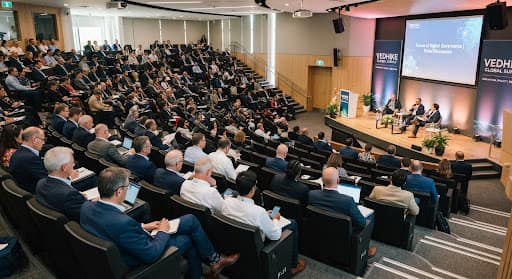
Illustrative conference venue reference, showing a hall and stage Sample venue reference
Venue context
ENTRANCE ARCHMASTER FILE · V2
ABC TECHNOLOGIES20 DEC 2026
ABC Annual
Conference 2026
Ideas meet. Possibilities open.
WELCOMEStep into
what’s next.
BENGALURU
ENTRANCE ARCHARTWORK CONCEPT · V2
12 ft × 9 ft · Vinyl / FlexSample design
A clear path to approval.

Entrance Arch · Version 2

Reviewed by Maya · sample
Approved
Product illustration · fictional event · no live actions
CAPTURE THE SPACECONNECT THE TEAMGET TO THE RIGHT VERSION

Great events shouldn’t
start with scattered files.

One photo in a chat. A brief in a spreadsheet. Feedback in another thread. Bring the details together before they get lost between the venue and the designer.

Site photos Event brief Feedback
One shared creative workspace.Requirements → versions → approvals

Follow one event.
See every step.

ABC Annual Conference 2026. One Entrance Arch.
A clear path from the first brief to the final report.

THE CREATIVE WORKFLOW Scroll to move the project forward
Admin
Step 1 of 8.

Every event starts with a clear brief.

Add the client, venue, date and creative brief. Give every requirement and every decision one shared home.

ABC Technologies · Bengaluru Convention Centre
DraftMaya creates the event as a draft, ready for planning.
studioCreative workspace
EventsABC Annual Conference 2026
New event · Admin workspace

A home for the whole project.

Client
ABC Technologies
Event name
ABC Annual Conference 2026
Venue
Bengaluru Convention Centre
Date
20 December 2026
Creative brief

A premium technology conference with coordinated on-site branding.

ABC Annual Conference 2026One project. Every creative requirement.
Draft
Admin
Step 2 of 8.

A brief becomes a design-ready checklist.

Bring backdrops, arches, standees and signage from the reusable library into the event. The Entrance Arch is the item we’ll follow.

Four item types. One coordinated event.
SelectedIllustrative quantities describe physical units; one item type may include several units.
studioCreative workspace
EventsABC Annual Conference 2026
Reusable design library

Build the event requirements.

Library → event items4 item types
Stage Backdrop1 unit · Main stage
Selected
Entrance Arch1 unit · Main entrance
Selected
Welcome Standees4 units · Registration foyer
Selected
Directional Signage6 units · Across the venue
Selected
The item we’ll followEntrance Arch

From a site requirement to approved artwork.

Admin / field team
Step 3 of 8.

Design for the actual space.

Attach a venue photo and enter measurements, placement and material notes. Give the designer the context that a message alone can’t carry.

Main entrance · 12 ft × 9 ft · Vinyl / Flex
CapturedDimensions are entered by a person. This illustration does not measure or scan a venue.
studioCreative workspace
EventsABC Annual Conference 2026
Entrance Arch · Main entrance

Capture the context.

Illustrative conference venue reference, showing a hall and stage Sample venue reference
12 ft
9 ft
Entered by the field team12 ft wide × 9 ft high

Material: Vinyl / Flex

Site instruction

Keep sponsor logo readable from the approach.

Captured

Reference photo and measurement overlay are illustrative; no automatic measurement.

Admin → Designer
Step 4 of 8.

The right brief. The right designer.

Assign the Entrance Arch to Priya and set a deadline. The photo, dimensions and site notes travel with the work.

Priya · due 14 December 2026
AssignedAssignments are made by the administrator; the product doesn’t select a designer automatically.
studioCreative workspace
EventsABC Annual Conference 2026
Assignment · Admin to designer

Move the brief into the right hands.

Entrance ArchPhoto, dimensions & notesCaptured
PPriyaGraphic designerAssigned
My Events / Entrance Arch

ABC Annual Conference 2026

Due 14 December 2026
Designer
Step 5 of 8.

Artwork, with all its context attached.

Priya creates the artwork in her preferred design tools, then uploads the file. Version 1 joins the event record beside its original brief.

entrance-arch-v1.pdf · Version 1
UploadedStudio organizes artwork. Designers create it externally. No file is uploaded from this preview.
studioCreative workspace
EventsABC Annual Conference 2026
Designer workspace · Priya

Version 1 joins the project.

Illustrative conference venue reference, showing a hall and stage Sample venue reference
Original reference12 ft × 9 ft

Main entrance · Vinyl / Flex

ABC TECHNOLOGIES20 DEC 2026
ABC ANNUALIdeas meet.
Possibilities open.
CONFERENCE 2026
WELCOME TO WHAT’S NEXT
BENGALURU
ENTRANCE ARCHARTWORK CONCEPT · V1
Externally created artwork · sample
entrance-arch-v1.pdfPriya · Version 1 · illustrated upload
Uploaded
Admin + Designer
Step 6 of 8.

Feedback belongs with the file.

Maya asks for the event title to stand out and the logo to be larger. Priya uploads V2 with both changes, and Maya reviews and approves it.

V1 → feedback → revised V2 → Maya’s approval
ApprovedIllustrative workflow. Revision-upload tools are still being refined.
studioCreative workspace
EventsABC Annual Conference 2026
Review · Maya + Priya

A better version. A clear decision.

ABC TECHNOLOGIES20 DEC 2026
ABC ANNUALIdeas meet.
Possibilities open.
CONFERENCE 2026
WELCOME TO WHAT’S NEXT
BENGALURU
ENTRANCE ARCHARTWORK CONCEPT · V1
V1 · Original artworkRevision requested
ABC TECHNOLOGIES20 DEC 2026
ABC Annual
Conference 2026
Ideas meet. Possibilities open.
WELCOMEStep into
what’s next.
BENGALURU
ENTRANCE ARCHARTWORK CONCEPT · V2
V2 · New layout & welcome arch
Maya approved
Maya · feedback on V1

“Make the event title stand out and enlarge the ABC logo.”

Illustrative feedback, revision and approval. No files are uploaded from this preview.

Client
Step 7 of 8.

A shared picture of where things stand.

Ananya sees the latest artwork and item statuses in an event-specific client view. Everyone can look at the same progress.

Four item types approved in this fictional event.
View-onlyClient previews are view-only. Direct client approval and seamless client login routing are not yet complete.
studioCreative workspace
EventsABC Annual Conference 2026
Ananya · ABC Technologies

The same event. A shared view.

View-only
4 / 4 item types approved100% · sample
ABCStage Backdrop
Stage Backdrop
ABC TECHNOLOGIES20 DEC 2026
ABC Annual
Conference 2026
Ideas meet. Possibilities open.
WELCOMEStep into
what’s next.
BENGALURU
ENTRANCE ARCHARTWORK CONCEPT · V2
Entrance Arch
ABCWelcome Standees
Welcome Standees
ABCDirectional Signage
Directional Signage

One item type may include multiple physical units. No client approval controls.

Admin
Step 8 of 8.

Finish with the complete picture.

Review the design items, versions and assignments in a printable report. When the event is ready, the admin marks it complete.

4 approved · 0 pending · 100% in this sample
CompletedEvent completion is a manual admin action. Browser print supports printing or saving the report.
studioCreative workspace
EventsABC Annual Conference 2026
Event design report · sample

Every item. Every decision. Together.

Item types4
Approved4
Pending0
Design item / versionStatus
Stage BackdropSample approved artwork
Entrance ArchPriya · V1 → feedback → V2
Welcome StandeesSample approved artwork
Directional SignageSample approved artwork
100% design approval

Maya manually marks the event complete.

Event completed

Draft → Active → Completed. Archiving is a separate manual action. Print or save this report through browser print.

Product illustration · fictional event · no live uploads or approvals

Different roles.
One shared picture.

A clear view for the person doing the work.
Explore the sample workspaces.

Maya · Event manager

Keep requirements and decisions moving.

Create the event, capture its spaces, assign work and review the results. One item record carries the decisions forward.

  • Manage event requirements
  • Capture site context
  • Assign designers & review artwork
Public role illustration · no account impersonation
studioAdmin preview
EventsABC Annual Conference 2026
Reusable design library

Build the event requirements.

Library → event items4 item types
Stage Backdrop1 unit · Main stage
Selected
Entrance Arch1 unit · Main entrance
Selected
Welcome Standees4 units · Registration foyer
Selected
Directional Signage6 units · Across the venue
Selected
The item we’ll followEntrance Arch

From a site requirement to approved artwork.

Less chasing.
More creating.

Keep the context close to the work.

Requirements stay organized.

One item record connects the location, brief and current status.

Designers get better context.

Photos, dimensions, materials and deadlines arrive together.

Reviews stay traceable.

Versions and feedback show how the artwork evolved.

Progress stays visible.

Review design statuses and print a consolidated event report.

Before your
next brief.

A few details about the workflow.

What does Studio manage?

Studio brings event-design requirements, venue photos, measurements, designer assignments, artwork versions, reviews and reports into one workflow. It is not an event registration system or ticketing platform.

Can I create artwork inside Studio?

Designers create in their preferred design software and upload the completed files. Studio manages the context, versions and reviews; it is not a drawing tool or an AI image generator.

Are venue measurements automatic?

No. Teams upload site photos and enter dimensions, placement, material notes and instructions. The animated measurement guides illustrate those manually entered details.

Can clients approve designs in their portal?

The current event-specific client view shows statuses and available artwork. Direct approval controls and seamless client login routing are not yet complete. Approval in this walkthrough is performed by an administrator.

How do revisions and reports work?

The illustrated workflow follows feedback, a revised upload and admin approval. The designer revision-upload interface still needs refinement. Reports can be printed or saved through browser print; there is no claim of a dedicated PDF export engine.

How do I get access?

Studio is marked Beta in the Vedhike suite. Use the existing Sign in link for account access, or ask the Vedhike team about availability. These public walkthrough screens use fictional local data and do not create events, upload files or impersonate users.

Give every event design
a clear path to approval.

Plan requirements. Capture the space.
Collaborate on artwork. Track the result.

Sign in to Studio Replay the lifecycle
Studio is in Beta. Walkthrough screens are illustrative.